AI creation workspace

Create clips, edits, and AI videos in one place.

Paste a link, upload a source, or start from a prompt. ViraClips helps you clip long videos, edit captions, mix characters, generate media, and queue finished posts.

50 free credits every month. No credit card required.

Clip
Ranked short-form batches
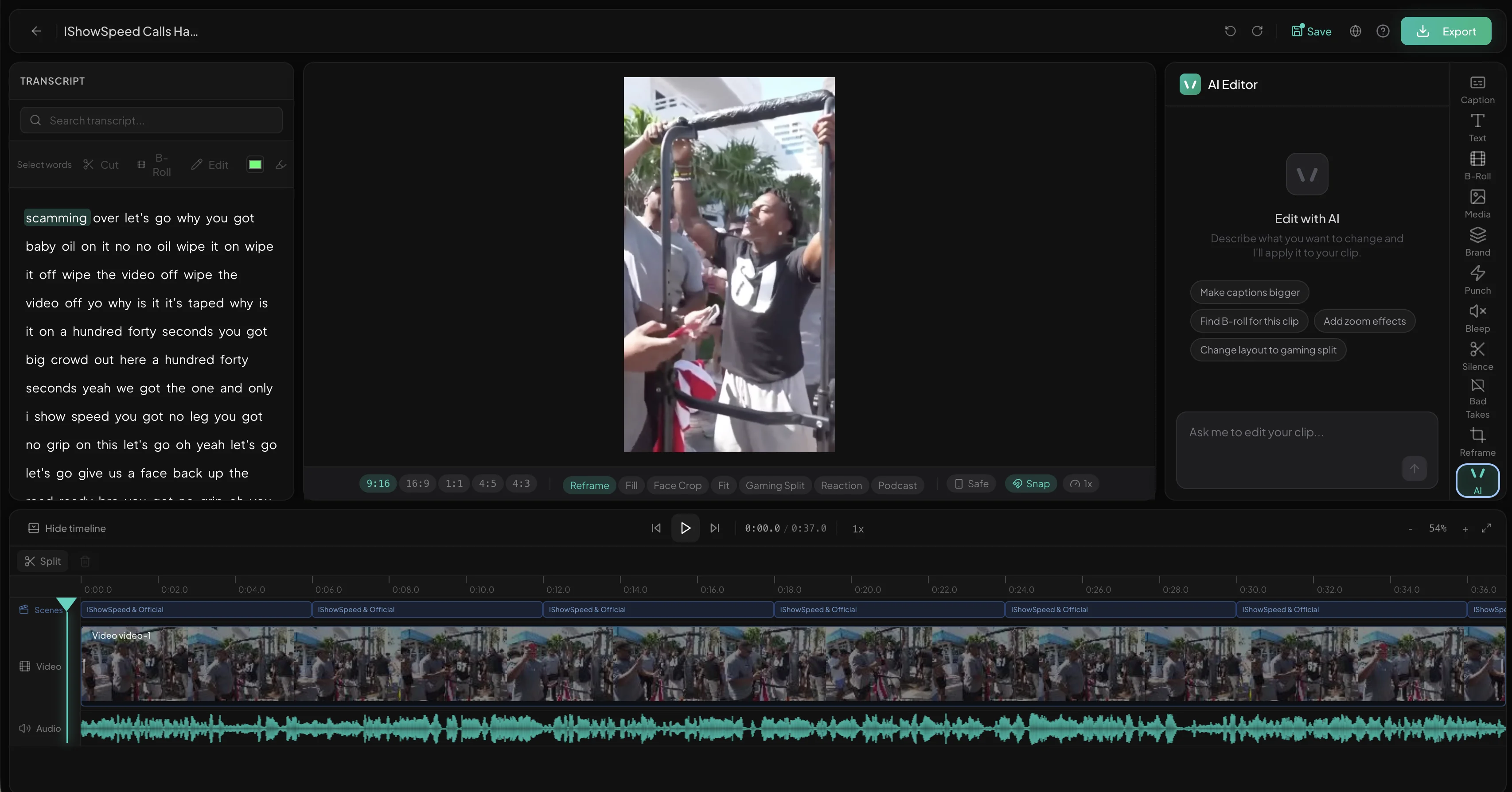
Edit
Captions, layout, timeline
Mix
Characters and references
Generate
Video and image models
Animate
Motion from prompts
Schedule
Queue posts after review

Works with your favorite platforms

YouTube
Twitch
TikTok
Instagram
Kick
X
Reddit
Spotify
YouTube
Twitch
TikTok
Instagram
Kick
X
Reddit
Spotify
YouTube
Twitch
TikTok
Instagram
Kick
X
Reddit
Spotify
Workspace pipeline

From input to finished output

Clipper is still the core workflow, but the product now supports the rest of the work around it: direct editing, generated assets, character mix, animation, and scheduling.

01 - CHOOSE

Start from the thing you have.

Paste a source link, upload a video, or start from a prompt. Vira routes the job into the right workspace so you are not forced through one clipper-only flow.

Source links. YouTube, Twitch, Kick, Reddit, and live sources for clip batches.
Direct upload. Open a standalone editor when you already have the source file.
Prompt starts. Generate video, images, motion graphics, or animation from a text brief.
upload, link, or prompt...
ClipperEditorCharacter MixGenerateAnimate
02 - DRAFT

Vira creates the first useful pass.

Clipper jobs become ranked short-form candidates. Editor uploads become editable text and captions. Prompt jobs become generated assets you can review instead of starting from a blank screen.

Ranked clips. Long sources are cut into scored candidates with hooks and titles.
Prepared editors. Uploaded videos open with captions and text-based editing context.
Generated media. Images, videos, characters, and animations come back ready to inspect.
Source video
30:39
0:12 Peak moment0:36 Emotional reaction0:48 Plot twist
03 - FRAME

Format the output for the channel.

Turn horizontal source footage into clean vertical clips, keep subjects framed, and choose the right layout for talking heads, gaming, podcasts, reactions, or generated assets.

Scene-aware. Detects scene changes and re-centers on the new subject automatically.
Smooth transitions. No stiff center crops or jarring jumps between subjects.
Layout intelligence. Picks the right aspect ratio and split-screen before export.
9:16
04 - EDIT

Polish the result in one workspace.

Adjust captions, trim timing, change layouts, add B-roll, edit hooks, or refine generated material without jumping into a separate editing tool.

10+ styles. Creator-style captions, classic subtitles, or your own custom look.
Quick edits. Change words, adjust timing, swap layouts, and review captions quickly.
Asset support. Use generated images, video, character mix, or animation as part of the campaign.
Bold Impact
I GOT STRANDED OUT HERE
05 - REVIEW

Review the strongest outputs first.

Vira organizes the work into a reviewable feed so you can approve the best clips, edits, and generated assets before anything leaves the workspace.

Scores and metadata. Clips include scores, hooks, titles, hashtags, and platform notes.
Saved workspaces. Uploads and editor projects can be resumed instead of recreated.
Batch output. Turn one source or campaign idea into a stack of posts.
AI-generated clips from a single video
06 - DISTRIBUTE

Export, schedule, or keep editing.

Move approved work into the scheduler, export files, or keep iterating. The same workspace handles short clips, direct edits, and generated creative.

Smart scheduling. Queue posts across connected channels after review.
Platform-ready exports. Right aspect ratio, right codec, and ready-to-post metadata.
Reusable pipeline. Use the same flow for clip batches, editor uploads, and generated assets.
Mar 2026
3 scheduled
M
T
W
T
F
S
S
10
11
TT
12
13
YT
14
15
IG
16
TT
Mar 11, 9:00 AM
YT
Mar 13, 9:00 AM
IG
Mar 15, 9:00 AM
Automation for repeat channels

Keep creator channels moving without babysitting every upload.

For repeat creators, clip accounts, and agencies: monitor sources once, review what Vira prepares, and keep publishing without rebuilding the workflow each week.

01
Watch sources

Track recurring YouTube, Twitch, and creator channels without checking manually.

02
Prepare output

New uploads can become clip batches, editor-ready sources, or campaign assets.

03
Review and ship

Approve the strongest work, then export it or move it into the scheduler.

Build a watchlistBest for repeat creators, clip accounts, and client channels.

Plans for clipping, editing, generation, and publishing

Start with 50 free credits every month. Upgrade for more credits, watermark-free exports, higher resolution, and broader model access.

Credits work across clipping, editing, and generation

Free

Try the workspace on a few source videos or prompts

Free
What's included
  • 50 credits/mo
  • 720p exports
  • Clipper, editor, and basic generation access
  • Auto captions
  • AI moment detection
  • SmoothTrack AI previews
  • Standalone video editor
  • Schedule & auto-post (10/mo)
  • 9:16 vertical exports

No credit card required

Starter

Keep one channel active with clips and AI assets

$15/mo
What's included
  • 400 credits/mo
  • 720p exports
  • No watermark
  • Clipper, editor, image, video, and animation tools
  • Auto captions
  • AI moment detection
  • SmoothTrack AI reframing
  • Standalone video editor
  • Character Mix access
  • Schedule & auto-post (30/mo)
  • 9:16 vertical exports

Secure checkout via Stripe. Cancel anytime.

Best fit

Pro

For operators managing multiple creators or content lines

$29/mo
What's included
  • 800 credits/mo
  • 1080p exports
  • No watermark
  • All creation tools and higher-volume model access
  • Auto captions
  • AI moment detection
  • SmoothTrack AI reframing
  • Streamer Profile context
  • Standalone video editor
  • Schedule & auto-post (100/mo)
  • All aspect ratios (9:16, 16:9, 1:1, 4:5)
  • AI B-roll suggestions
  • Thumbnail generation
  • Character Mix, AI image, video, and animation workflows
  • Live stream monitoring

Secure checkout via Stripe. Cancel anytime.

Questions

Frequently asked questions

Answers about credits, uploads, editing, generation, scheduling, and exports.

Ready to build from a link, upload, or prompt?

Start with clipping, editing, image generation, video generation, character mix, or animation. No credit card required.

Start Creating Free