01
Drop in a video or stream URL
Upload a file, paste a YouTube or Twitch link, or caption any clip Artae already generated.
Artae generates accurate AI subtitles, animates them word by word, and renders them into short-form videos that look native on TikTok, YouTube Shorts, Instagram Reels, and X.
Live caption styles
Use the arrows to switch presets
Style systems
Use aggressive creator captions for hooks, quieter editorial subtitles for interviews, and brand presets when every export needs to look like the same channel.
Bold Impact
Hook moments
Playful
Reaction clips
Dynamic Highlight
Talking head
Heavy Outline
Gameplay
Caption workflow
The caption tool is part of the full Artae production loop: clipping, smart crop, transcript, caption styling, and export all live in one browser workspace.
Upload a file, paste a YouTube or Twitch link, or caption any clip Artae already generated.
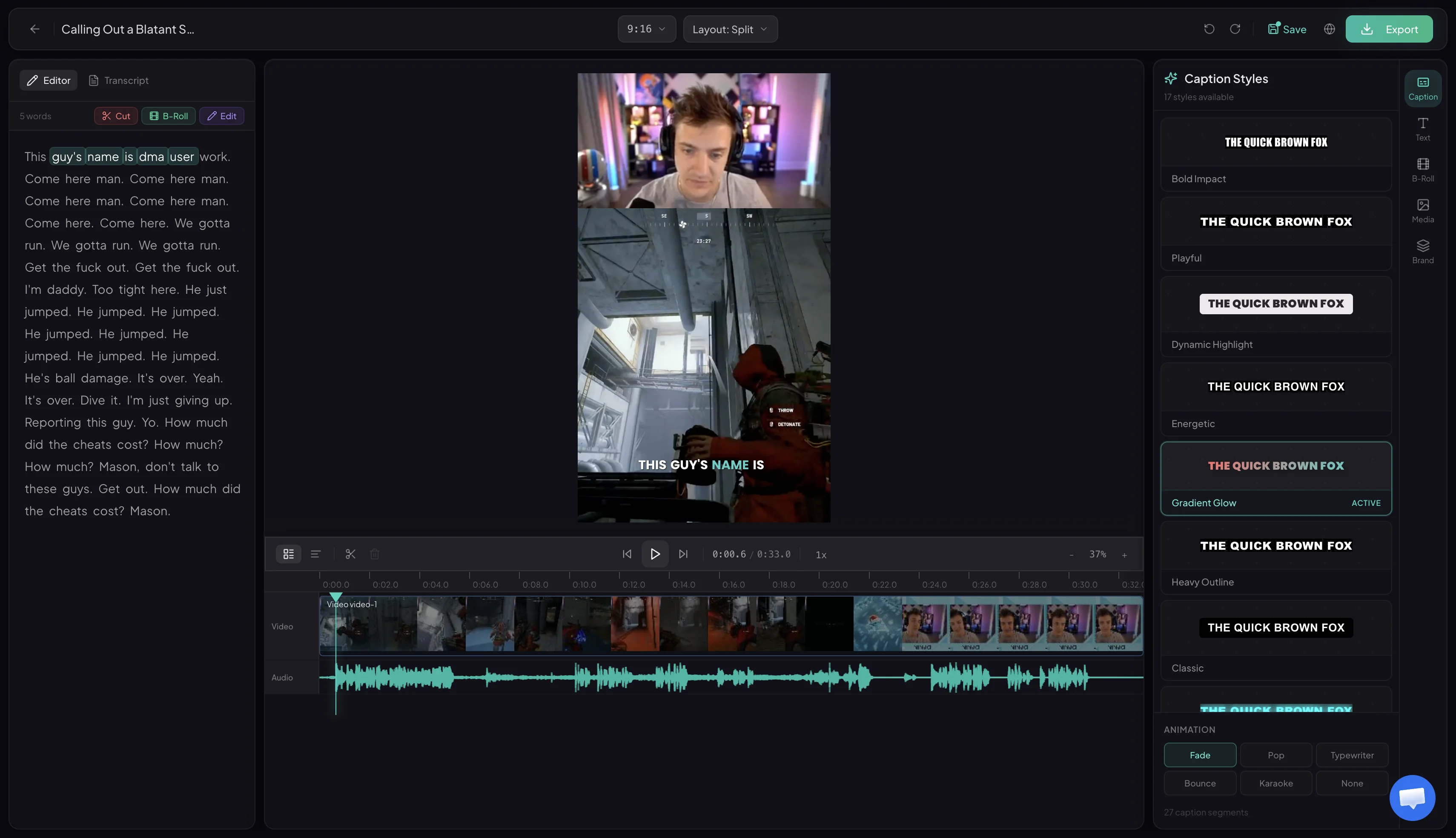
Fix names, trim filler, merge lines, and keep every caption synced to the original speech.
Choose word-by-word animation, safe-zone placement, font, emphasis color, and brand styling.
Burn captions into 9:16 videos so they display correctly on TikTok, YouTube Shorts, Reels, and X.
Built into the editor
Captions are editable after generation. Correct the transcript, move the caption block away from faces, change the preset, and keep the export path intact.
Change words, punctuation, and line breaks.
Keep captions clear of platform UI overlays.
Reuse fonts, colors, and emphasis styles.
Who uses it
Podcast clips where viewers need context before unmuting
Gaming moments with fast speech, reactions, and overlapping audio
Talking-head videos that need readable subtitles on mobile
Agency batches where every client needs a consistent caption style
Stream highlights that need captions, crop, and hook text together
Output brief
vertical-safe caption positioning
watermark on every plan
steps from source video to export
Auto caption FAQ
Short, direct answers for creators comparing auto subtitle tools, caption generators, and full clip editors.
Auto captions are subtitles generated from the spoken audio in a video. Artae turns speech into synced caption text, then renders styled subtitles directly onto short-form clips for TikTok, YouTube Shorts, Instagram Reels, and other social platforms.
Yes. You can edit transcript text, fix names, adjust timing, change caption position, and choose different visual styles before export. The editor keeps the captions synced while you polish the final clip.
Yes. Artae renders captions into the final video file, so the subtitles appear consistently on every platform without relying on native subtitle tracks or viewer settings.
Yes. Caption placement is designed for vertical 9:16 content, with mobile safe-zone awareness so subtitles avoid common app overlays where possible.
Yes. Artae can find clips from long videos and add captions, smart cropping, hooks, and exports in the same workflow. You can also use caption styling inside the editor after clips are generated.
Paste a video link, generate clips, and export captioned short-form videos from the same workspace.